

The most feature-rich app isn't automatically the right one. The best human design app in 2026 depends on how you want to use your chart: for exploring relationship dynamics, Human Design: Personal Insight offers compatibility analysis.
A chart is most useful when you can access it easily and understand what it shows. You may want a straightforward way to retrieve your chart, clear explanations, or tools for comparing charts. Free access and paid features also matter, especially if you’re still learning Human Design.
This guide compares the best Human Design apps by features, chart retrieval, pricing, and free access to help you find a fit for your practice. It also covers accessibility and privacy, practical considerations when an app handles personal birth details. Use the comparison to identify what you need now and which features may matter as your study develops.
Key Takeaways
- Compare chart access, interpretation tools, and compatibility features to find an app that fits how you plan to study Human Design.
- Look beyond a free tier or subscription price: weigh which features are available and how you expect to use them.
- Use reviews to identify practical strengths and limitations, while separating personal preferences from features that matter to your own practice.
- Understand how birth time and other birth details shape a chart before choosing an app’s retrieval method.
- Consider how an app handles birth data, and balance personalized guidance with privacy and transparency.
1. App features and retrieval methods
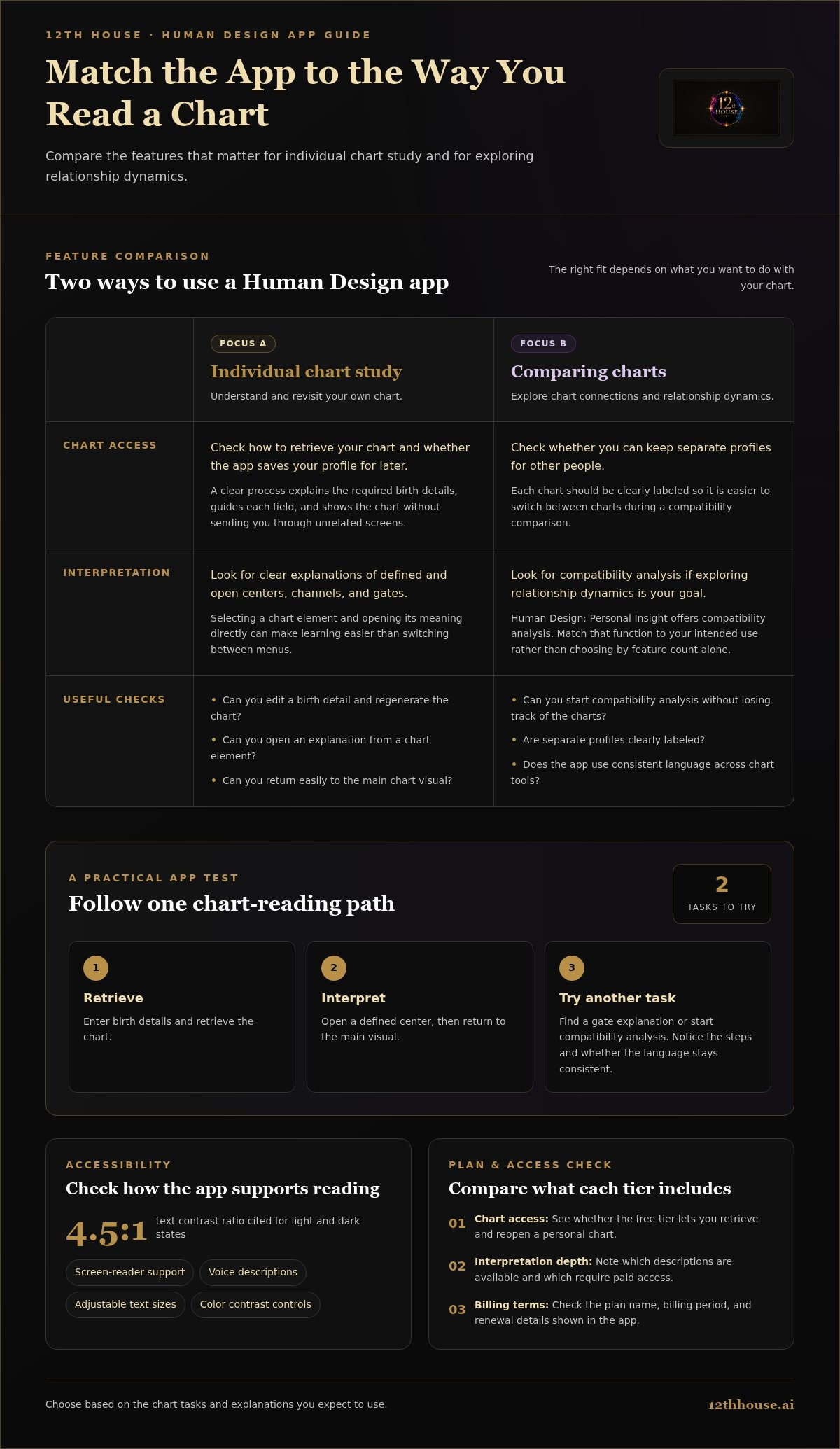
Start with how you retrieve a chart. Most tools ask for birth details, then calculate and display a Human Design bodygraph. Check whether an app saves your profile for later or asks you to enter the information again. A clear process explains which details are needed, guides you through each field, and displays the chart without making you search unrelated screens.
Next, consider how the app turns a chart into useful information. A bodygraph can show defined and open centers, channels, and gates, while written explanations give those symbols context. Check whether selecting a chart element opens its meaning directly. For example, connecting a named center to its explanation on the same screen can make learning easier than switching between menus.
Look at the depth of the tools, not just the number of screens. Human Design: Personal Insight offers compatibility analysis for exploring relationship dynamics. That may suit readers comparing charts, while someone studying an individual chart may prioritize clear descriptions and easy access to its components. First identify your intended use, then match it to the app’s functions.
Consider how an app handles chart corrections. If you spot an error in a birth detail, look for a direct way to edit the profile and regenerate the chart. Check whether you can keep separate profiles for other people and whether each chart is clearly labeled. These features can reduce confusion when switching between your chart and a compatibility comparison.
Accessibility belongs in the feature comparison. In 2026, useful options include screen-reader support, voice descriptions, adjustable text sizes, and controls for color contrast. Text contrast should meet a 4.5:1 ratio in both light and dark states. These tools matter when you read chart explanations for extended periods or rely on audio and larger type to understand complex terminology.
Before choosing the best human design app in 2026, test one complete path: enter birth details, retrieve the chart, open a defined center, and return to the main visual. Then try a second task, such as finding a gate explanation or starting compatibility analysis. Notice how many steps each task takes and whether the app keeps its language consistent. A coherent interface helps you move from chart calculation to interpretation without losing the structure of what you’re learning.
2. Pricing and free tiers
Compare what each plan includes before weighing its cost. A free tier may provide an initial chart, while a paid plan may put additional interpretation tools behind a subscription. Read the feature descriptions, then match them to your intended use. If you only need one chart, recurring access may matter less than if you plan to study charts over time.
Treat that as a specific offer, not a universal price for Human Design apps. Plans can vary in duration, features, and billing structure. Before choosing a paid tier, note the exact plan name and billing period shown in the app, then compare them with the features you expect to use.
Use a free tier as a practical test, not just a low-cost entry point. Try a meaningful task, such as opening your chart explanation or saving a profile. Then consider whether the free version gives you enough context to understand the result. A chart image may suit experienced readers, while a new student may value clear definitions and linked interpretations.
- Check chart access: See whether the free level lets you retrieve and reopen a personal chart.
- Compare interpretation depth: Note which descriptions remain available and which require paid access.
- Review billing terms: Read the displayed period, renewal details, and plan name before subscribing.
- Test your real use: Complete one task on the app screen, then decide whether its paid features move your practice toward a clear goal.
Distinguish a one-time purchase from a recurring subscription when an app offers both. A one-time payment applies to a single purchase; a subscription follows its stated billing period. Don’t assume a promotion is the standard price or that every plan includes every feature. Compare the checkout offer with the plan description in the app.
For a balanced choice, list the features you need before opening a pricing page. A reader focused on chart retrieval may prioritize saved profiles; someone exploring relationship dynamics may value compatibility analysis. Match those needs to free and paid access, then choose a plan that supports your next step without paying for tools you won’t use. Revisit your choice as your study habits change.
3. What do user reviews say about the best Human Design apps?
Reviews are most useful when they describe a specific task, not just give a star rating. Look for comments about generating a chart, finding an explanation, or returning to a saved profile. “I found my chart quickly” gives more practical information than “great app.” Match each comment to the feature you intend to use.
Separate comments about the interface from comments about interpretation. “The chart is easy to read” describes the visual design. “The explanation helped me understand an open center” describes the learning experience. These are different strengths. For ongoing study, prioritize detailed comments that name a chart element, explain what the app did, and say whether the wording was clear.
Pay attention to each review’s date and context. An older comment about a confusing menu may refer to an earlier version, while a recent one may reflect a changed interface. Compare several reviews that mention the same feature. Repeated, specific observations are more informative than an extreme review without an example.
- Chart access: Find reviews that describe entering birth details and reopening a chart.
- Interpretation: Look for named elements, such as a center, gate, or profile.
- Navigation: Note comments about moving between the bodygraph and explanations.
- Paid features: Compare comments about what appears behind a subscription with the app’s plan description.
Read critical reviews for the problem behind the complaint. “Too much information” could mean the explanations are detailed but difficult to scan. “Not enough detail” could reflect a reader seeking advanced analysis. Translate each comment into a question about your needs: do you want concise definitions, layered explanations, or compatibility tools?
Imagine two reviews of a Human Design app. One praises a simple chart screen but says the explanations are brief. Another values detailed descriptions but finds the menus difficult to follow. Neither review establishes which app is better. Together, they reveal a trade-off between quick orientation and deeper study. Decide which matters more for your routine.
Use reviews as evidence about the app experience, not proof that a Human Design interpretation is universally correct. People respond differently to symbolic language. A useful review explains how someone applied a feature, such as comparing charts or studying a defined center. That detail helps you judge relevance without treating one person’s interpretation as a standard.
Before choosing among the best Human Design apps, make a short review checklist: feature mentioned, task performed, explanation quality, and review date. Compare those observations with the app’s listed tools. This turns scattered opinions into a practical decision based on the parts of the experience you’ll actually use.
4. How accurate does a Human Design chart need to be, and what birth details are required?
A Human Design chart depends on the birth information entered into its calculator. Most chart forms ask for your birth date, local birth time, and birthplace. You may need to enter a city and country, not just a time zone. Accurate details help the app apply the location and time information needed for its calculation.
Birth time deserves close attention. Check a birth certificate, hospital record, or family record if one is available. Enter the recorded local time, including whether it was morning or evening when the form uses a 12-hour clock. A vague estimate such as “around noon” can leave uncertainty about the chart output, especially if the calculator uses time-sensitive inputs.
Birthplace matters because the calculator uses location to interpret local time and time-zone rules. Enter where the birth occurred, not where you grew up. If you were born in a small town, use the nearest recognized location the app offers, then check the result for an obvious mismatch. Don’t substitute your current location.
There’s no universal accuracy percentage or time tolerance for every Human Design chart. Use the best birth record available and enter it consistently. If the exact time is uncertain, don’t treat a chart based on an estimate as identical to one calculated from a documented time. Keep that uncertainty in mind when studying details that depend on the calculation.
Use a simple checking sequence before saving a chart:
- Confirm the date: Compare the entered day, month, and year with your birth record.
- Review the clock time: Check the hour, minutes, and morning or evening selection.
- Verify the birthplace: Select the actual birth location, not a later residence.
- Inspect the profile: Make sure the app saved the intended details before interpreting the chart.
If two records show different times, note both rather than choosing one without explanation. You can enter each plausible time separately and compare whether the bodygraph or explanations change. Treat this as a way to see how sensitive the result is to the input, not proof that one version is correct. The original record is the clearest reference for the data you use.
Accuracy also has a practical limit. A correctly entered chart means the app processed the birth details you provided; it doesn’t establish that every interpretation describes your life. Read chart language as a framework for reflection, and distinguish the calculation from the meaning you draw from it. Start with accurate records, consistent entries, and care when interpreting results based on an uncertain time.
5. What privacy risks should users consider when sharing birth data with Human Design apps?
A chart request can include a birth date, birth time, and birthplace. Together, these details form a personal data record, especially when connected to an account, email address, or saved profile. Before entering them, identify what the app requests and whether each field is used for chart generation or another feature. A birth city may support calculation, while a profile name may simply organize saved charts.
Read the privacy notice before creating an account. Look for clear explanations of what data the app collects, why, and how long it keeps it. Note whether the notice describes sharing with service partners or using information to personalize features. If the app stores charts, find the account controls for deleting a profile or removing saved birth details.
AI features create another consideration. A personalized response may use chart details and the question you type, such as asking how a defined center relates to a current decision. In 2026, balance AI personalization with privacy and transparency. Before using a chat feature, understand what information it receives and whether the app explains how submitted questions are handled.
Use a simple privacy review before sharing birth data:
- Inspect requested fields: Enter only the details needed for the chart task.
- Review account settings: Locate saved profiles, data controls, and deletion options.
- Check AI disclosures: See how chart details and prompts support personalized answers.
- Limit identifying context: Avoid adding names, addresses, or intimate details when they aren’t needed for your question.
Consider other people’s information, too. A compatibility feature may ask for another person’s birth details. Handle that data carefully, and avoid adding identifying notes that aren’t needed for the comparison. Where the app allows unnamed profiles, a label such as “partner” can be used instead of a full name.
Account security is part of privacy. If an app supports passwords, choose one you don’t reuse elsewhere, and protect the email account connected to it. Review device permissions, too. A chart calculator doesn’t automatically need access to contacts, a microphone, or location when you enter birth details manually. Consider whether each permission matches the feature you’re using.
Privacy review shouldn’t end at installation. Revisit settings when you add an AI feature, create another profile, or change how you use the app. For a more reflective next step, continue exploring your chart while keeping personal details limited to what your inquiry requires.
12Th House: Ask Lala AI Spiritual Guidance
12th House’s Ask Lala AI Spiritual Guidance can help you explore questions that arise while interpreting your Human Design chart. Use it when a chart element prompts a personal inquiry, or when you want to consider how symbolic frameworks relate to a situation in your life. The guidance complements chart study; it doesn’t replace your own judgment or the careful review of birth details.
If your exploration extends beyond Human Design, Astrology Birth Chart & Transit Analysis, Tarot Readings, and Numerology Reports offer other lenses for reflection. Choose the tool that fits the question you’re working with, and keep your inquiry specific enough to examine thoughtfully.
Visit 12th House online to explore Ask Lala AI Spiritual Guidance.
Turn chart study into a meaningful next step
The best Human Design app in 2026 can organize your chart, but your questions give that map direction. Choose one theme to explore, such as decision-making, connection, or the patterns you notice in daily life. Then consider what kind of reflection would help you examine it with greater clarity.
When a chart prompts a personal question, 12th House’s Ask Lala AI Spiritual Guidance offers a way to explore it. You can also approach self-reflection through Astrology Birth Chart & Transit Analysis or Tarot Readings. Each offers a distinct interpretive lens, so begin with the inquiry that feels most useful rather than trying to resolve everything at once.
Keep your exploration intentional. Write down the question you want to examine, notice which ideas resonate, and leave room for your own conclusions. A tool can provide structure; your attention gives the inquiry meaning.
Explore Ask Lala AI Spiritual Guidance and continue your personal inquiry with care and curiosity.
Frequently Asked Questions
What are the best Human Design apps available in 2026?
The best fit depends on whether you want chart interpretation, relationship comparison, or a simple reference. Human Design: Personal Insight offers compatibility analysis for exploring chart dynamics between people. For individual study, prioritize an app that makes explanations easy to find and revisit. Choose based on the task you’ll return to, not a broad “best” label alone.
How do the top Human Design apps compare in features and accuracy?
Compare each app’s tools, and distinguish them from chart calculation. One may emphasize visual chart navigation, while another offers compatibility analysis or more explanatory text. For a practical comparison, enter the same birth details in each tool and see whether the chart elements match. Differences in interpretation wording show how an app presents the system, not necessarily a different calculation.
Which Human Design apps offer birth chart and bodygraph readings?
Look for apps that generate a Human Design chart from birth details and display its bodygraph. Feature descriptions should make clear whether the app provides the chart itself, written interpretation, or both. 12th House offers Human Design Profiles for readers who want to explore this system. If you’re comparing tools, search their feature descriptions for “bodygraph” and examples of the chart elements they explain.
What are the prices and subscription plans for popular Human Design apps?
Plans vary by app and by included features. Compare the plan name, billing period, renewal terms, and the tools it unlocks. For example, check whether a subscription covers saved charts, compatibility analysis, or interpretation features you intend to use.
Which Human Design apps are free or offer free trials?
Free access and trials depend on each app’s plan structure. A free chart calculator, a limited free tier, and a time-limited trial are different offers. Before relying on free access, identify which functions remain available afterward. For example, check whether you can reopen your chart and its explanations or whether those features require a paid plan.
Which Human Design apps are available on iOS and Android in the United States?
Availability depends on the app and its platform versions. In the United States, distinguish a native iOS or Android app from a mobile-friendly website, since they offer different ways to access a tool. Search the relevant app storefront using the exact app name, then compare the publisher and feature description. If you prefer a browser, confirm that the tool works on your device.
Do Human Design apps explain type, strategy, authority, profile, and centers?
Some apps explain these chart elements, but the level of detail varies. A concise reference may define type and strategy, while a more layered guide may connect authority, profile, and centers. Try a focused learning sequence: read the explanation of your type, then see how the app describes your authority and profile together. This shows whether its explanations help you understand how the terms relate.


