
The best Nebula app alternative is one that fits your astrology interests and privacy preferences. Compare the tools each app offers with how clearly it explains data collection, use, and account controls. More features do not automatically make a better fit.
It makes sense to want personalized readings while staying mindful of what you share to receive them. Birth details and personal questions can feel intimate, so an app’s privacy approach deserves as much attention as its charts, interpretations, and daily guidance.
This guide compares astrology app alternatives by privacy and security, the depth of their tools, ease of use, and pricing transparency. You’ll learn what to look for in each area, how different approaches suit different needs, and how to use a simple decision guide to narrow your options.
Key Takeaways
- Assess privacy by looking at the information an app collects, how it uses or shares it, and what controls you have over your account.
- Choose based on the kind of astrology and level of detail you want, not just the number of features on offer.
- Compare free access and paid plans by examining paywalls, renewal terms, and cancellation steps, not just the initial price shown.
- Match app access to your routine by considering whether you want to use it on iOS, Android, or a web browser.
- Use the decision guide to weigh privacy, functionality, ease of use, and pricing transparency against your own priorities.
Privacy and security considerations
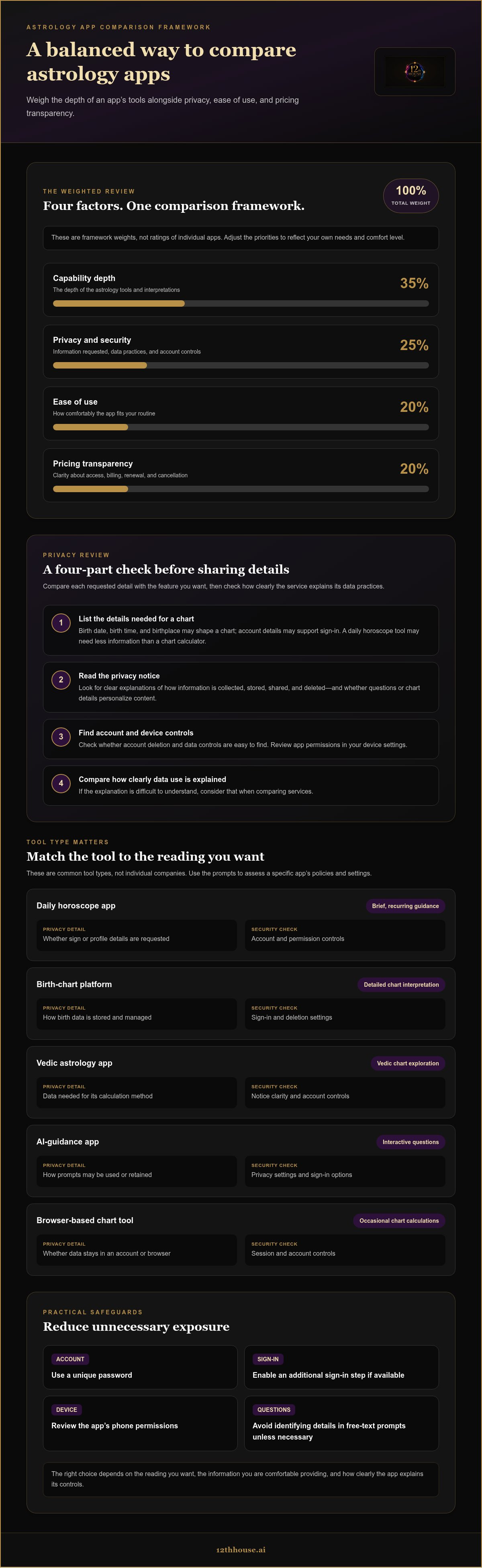
A Nebula app alternative should suit your privacy boundaries as well as your astrological interests. Start by reviewing the information an app requests. Birth date, birth time, and birthplace can shape a chart, while account details may support sign-in. A daily horoscope tool may need less personal information than a chart calculator. Compare each requested detail with the feature you want to use.
Next, read the privacy notice before entering chart details. Look for clear explanations of how information is collected, stored, shared, and deleted. Check whether the app uses your questions or chart details to personalize content, and whether account deletion and data controls are easy to find. If the explanation is difficult to understand, consider that when comparing apps.
Use a repeatable review process. The comparison framework here assigns capability depth 35%, privacy and security 25%, ease of use 20%, and pricing transparency 20%. These weights help balance the chart tools against the information you share. A platform with extensive interpretations may still rank poorly for your needs if its data practices are opaque. Adjust the priorities to reflect your own comfort level.
Review practical safeguards in the app and your account settings. Use a unique password and enable an additional sign-in step if available. Check your phone’s permissions: a chart app generally needs a different access profile from a tool that uses location. Avoid including identifying details in free-text questions unless necessary. These steps can reduce unnecessary exposure without assuming every service handles data the same way.
- List the details required to create a chart.
- Find the privacy notice and account deletion controls.
- Review app permissions in your device settings.
- Compare how clearly each service explains data use.
For example, someone seeking daily sign-based guidance might choose a tool that requests minimal profile details. Someone calculating a birth chart may need to provide birth information, then decide whether the added detail is worth sharing it. The right choice depends on the reading you want and the information you’re comfortable providing.
The table compares common types of tools, not individual companies. Use each cell as a prompt to evaluate a specific app’s published policies and settings.
| Option | Privacy details to assess | Security checks | Best fit |
|---|---|---|---|
| Daily horoscope app | Whether sign or profile details are requested | Account and permission controls | Brief, recurring guidance |
| Birth-chart platform | How birth data is stored and managed | Sign-in and deletion settings | Detailed chart interpretation |
| Vedic astrology app | Data needed for its calculation method | Notice clarity and account controls | Vedic chart exploration |
| AI-guidance app | How prompts may be used or retained | Privacy settings and sign-in options | Interactive questions |
| Browser-based chart tool | Whether data stays in an account or browser | Session and account controls | Occasional chart calculations |
Choose the option whose privacy explanations, controls, and requested details fit your intended use.
Choosing an alternative by user needs
Start with what you want to do, then compare access and plan structure. A daily horoscope reader needs a different set of tools from someone studying birth charts.
IOS, Android, and Browser Availability
Availability affects how an astrology tool fits your routine. Check the Apple App Store for iOS, Google Play for Android, and the service’s website for browser access. Some options focus on mobile apps, while others may work in a browser. Compare the same task across platforms, such as saving a chart or revisiting a reading. Choose a format you can use consistently.
Pricing and Free Plans
Free access and paid plans can differ in what they include. A free tier might provide basic readings, while detailed interpretations or additional tools may require a subscription or purchase. Compare included features, billing period, renewal terms, and cancellation steps before choosing. Look beyond the word “free” to understand which parts of the experience require payment.
Match the tool to your main question. For a quick daily check-in, prioritize readable forecasts and an interface that’s easy to revisit. For chart study, look for clear explanations of placements, houses, and aspects. If you want interactive guidance, consider whether you prefer structured prompts or open-ended questions. Focusing on one main use helps keep feature lists from driving your decision.
Astrological traditions also shape the framework you’ll explore. Western astrology commonly organizes interpretation around twelve signs, while Vedic astrology uses twenty-seven lunar mansions. If you’re comparing both, consider which system you want to study and whether the app explains its terminology. Clear explanations can make complex charts easier to interpret, especially when you’re learning unfamiliar concepts.
Use a weighted score to compare options against your priorities. The review framework assigns capability depth 35%, privacy and security 25%, ease of use 20%, and pricing transparency 20%. Keep those weights if they match your needs. If browser access matters most, give platform fit more attention in your personal notes. Record the reason behind each score, not just the number.
- Daily guidance: prioritize readable forecasts and simple navigation.
- Chart study: compare interpretation depth and system coverage.
- Interactive exploration: assess prompt style and response structure.
- Flexible access: note whether iOS, Android, or browser use fits best.
Then shortlist two or three options. Try the same question or chart task in each, and compare clarity, navigation, and access to essential features. For example, a tool focused on short daily forecasts may not suit you if you mainly study natal placements. A focused shortlist makes the trade-offs easier to see.
If chart work is your priority, explore a structured approach to chart interpretation as one way to continue your study.
How much do Nebula alternatives cost, and do they offer free plans?
Astrology app pricing depends on the service and its plan structure. Some tools offer free access, while others require subscriptions or purchases for specific features. Compare the full terms before choosing. A free daily horoscope, for example, may not include detailed birth-chart interpretations. The useful question is what you can do without paying and what changes if you upgrade.
Start by identifying the plan type. A free tier may provide a limited set of readings or tools. A trial may temporarily unlock paid features before billing begins. A subscription may renew for a stated period, while a one-time purchase may unlock a particular feature. These models differ, so check the plan description and billing screen to see which one applies.
Then compare the value of the included features. If you want daily guidance, assess whether the free version supports that routine. If you study natal charts, look for the interpretation features included in each plan. A low-cost entry point may not meet your needs if the core chart tools require an upgrade. List the features you’ll actually use, then compare them with each plan’s terms.
- Free access: identify which readings and tools remain available.
- Trial access: note when the trial ends and what follows.
- Subscription: review the billing period, renewal, and cancellation process.
- One-time purchase: check which feature or content it unlocks.
Pricing transparency matters as much as the advertised plan. Before committing, check whether the payment screen shows the amount, billing frequency, and renewal terms. Compare those details with the app’s plan description. If a trial converts to a subscription, note the conversion date and cancellation steps. Keep the details together, especially when comparing options on iOS, Android, and browser platforms.
Use the review framework’s pricing transparency weight of 20% as a comparison guide. Give a higher score to a plan that clearly presents its terms and included features. Consider how that score balances against capability depth at 35%, privacy and security at 25%, and ease of use at 20%. A transparent plan can still be a poor fit if its available readings don’t match your needs.
For example, imagine comparing a free horoscope tool with a subscription-based chart platform. The first may suit brief daily check-ins, while the second may offer features for ongoing chart study. Compare what each plan actually includes rather than assuming a paid option is automatically more useful. Choose based on the readings you’ll use and the payment structure you prefer.
Before selecting a Nebula app alternative, use this short review:
- Write down the astrology features you need.
- Separate free tools from trial-only and paid features.
- Record each plan’s billing and renewal terms.
- Score pricing transparency alongside the other review criteria.
This process turns a price comparison into a practical assessment of fit. The best option for you is the plan whose terms and available features match your intended use.
Which Nebula alternatives are available on iOS, Android, and web browsers?
Platform access determines where you can calculate a chart or revisit guidance. Compare Apple App Store, Google Play, and browser access separately. An astrology service may offer a mobile app, a browser-based experience, or both. Don’t assume every format includes the same features. The best fit depends on the devices you use and the tasks you want to complete.
For iOS, search the Apple App Store using the exact service name. Read the listing for supported devices, app functions, and account requirements. Do the same in Google Play for Android, then compare each store description with the service’s browser experience. For example, if you use an iPhone and a laptop, prioritize options that support both formats.
Browser access may suit readers who prefer a larger screen or switch between devices. Visit the service’s official website and check whether chart calculations, saved readings, and account features work there. A mobile app may make daily forecasts quick to access, while a browser layout may make longer chart interpretations easier to read. Compare how well each format handles the task, not just its platform label.
| Access format | Where to look | Compare these details | Useful for |
|---|---|---|---|
| iOS app | Apple App Store | Device support and listed features | iPhone-based daily use |
| Android app | Google Play | Device support and listed features | Android-based daily use |
| Browser experience | Service website | Chart tools, saved readings, and account access | Computer use or switching screens |
| Multiple formats | Store listing and website | Feature consistency across formats | Moving between devices |
Use the same chart task to compare formats. Enter the same birth details in the app and browser, then see whether both show the same chart information. Compare navigation, readability, and access to saved results. If you mainly read short forecasts, a phone interface may feel more direct. If you study houses and aspects, a larger browser display may help you examine the chart structure.
Before choosing an astrology app, make a short platform checklist:
- Identify your main device, such as an iPhone, Android phone, or computer.
- Find the service’s exact listing in the relevant app store.
- Open its website to assess browser access.
- Compare the same reading task across available formats.
Platform access also affects continuity. If you switch between an Android phone and a desktop browser, compare whether the same account carries your saved chart or reading history. If you use an iPad, assess whether the iOS app’s layout suits its screen. These examples help you judge practical fit without assuming every service syncs information across devices.
Choose the format that fits your routine. A reader who checks a horoscope during a commute may prefer an app. Someone who studies a birth chart at a desk may prefer browser access. If you use both, prioritize services that provide the specific tools you need on each device, then compare how easy they are to use before settling on an alternative.
12Th House: Ask Lala AI Spiritual Guidance
12th House offers Ask Lala AI Spiritual Guidance for readers seeking a focused space to explore personal questions through spiritual reflection. Turn to it when you want to examine a question beyond comparing app features. For chart-centered study, Astrology Birth Chart & Transit Analysis offers a route into birth-chart interpretation. Tarot Readings provide another framework for reflection when cards better match the question you’re exploring. Each offering supports a different approach, so choose according to the lens you want to use, rather than expecting every method to answer in the same way.
Visit 12thhouse.ai to explore Ask Lala AI Spiritual Guidance.
Choose a path that supports your next question
Your next astrology tool should create space for reflection, not simply add another stream of forecasts. Once you’ve chosen an app that suits your preferences, notice which questions keep returning. Are you looking for a wider view of your birth chart, a focused spiritual prompt, or a different symbolic lens? Let that question guide what you explore next.
If you want to move beyond comparing a Nebula app alternative, 12th House offers Ask Lala AI Spiritual Guidance, Astrology Birth Chart & Transit Analysis, and Tarot Readings as distinct ways to approach personal inquiry. Choose the format that fits the question in front of you, and use it as a structure for your own reflection.
Ask 12th House for astrology advice and take your next step with intention.


